Kahoot Akış

Kahoot Quiz Çözücü — Anında Yapay Zeka Yanıtları

Kahoot üzerindeki her soru için anında yapay zeka önerileri ve ayrıntılı açıklamalar alın.

10+ platform
Saniyeler içinde yapay zeka yanıtları
Ücretsiz kurulum

Question detection

How QuizSolver works on Kahoot

Kahoot is different because some games show the question on the player screen while others show only colored answer tiles. QuizSolver supports both visible-question mode and Quiz ID answer-bank mode for hidden-question games.

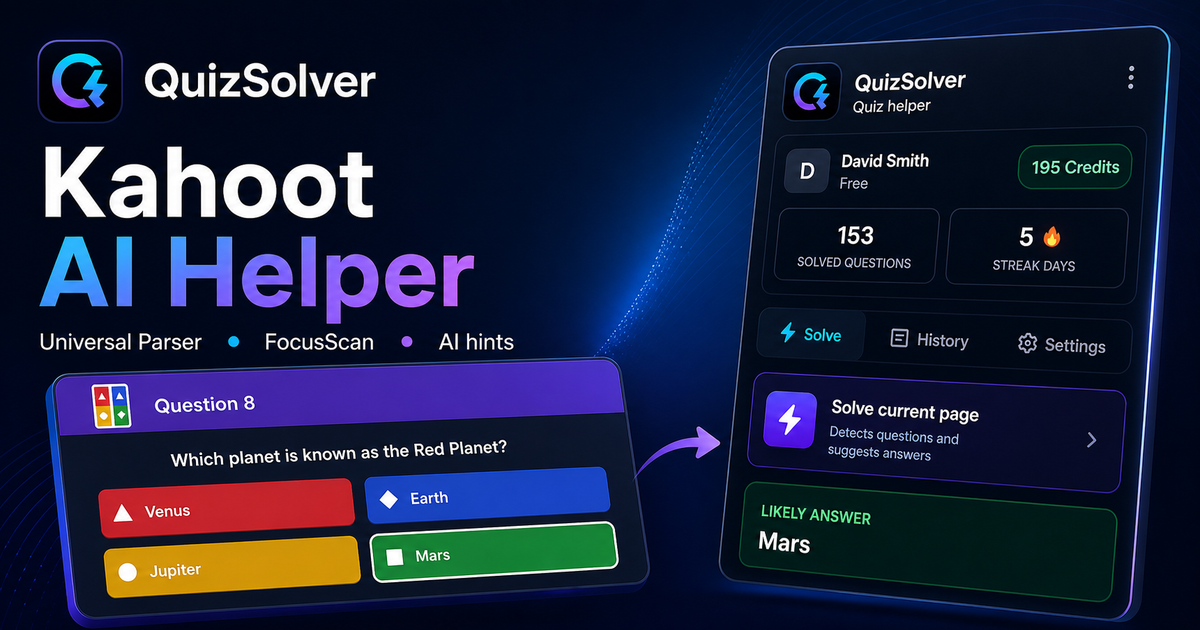
Under the hood, QuizSolver uses a universal parser: it compares the question text with nearby answer choices, form controls, images and the visible page layout. Tuned workflows improve reliability on popular platforms, and if standard detection does not return a meaningful question, FocusScan lets you select the exact screen region.

Every saved question can go to history with the answer, explanation and your own note. That means the platform workflow does not stop at a one-time hint: solved tasks become a private review library and practice quiz source.
Practical workflow

How to use QuizSolver reliably on Kahoot

A useful Kahoot solver page should explain the real workflow, not only repeat that AI answers are available. QuizSolver first reads visible question structure, nearby choices, field types and page context before it asks AI for a suggestion.

This workflow is designed for real quiz pages: radio answers, checkboxes, text inputs, image prompts, long instructions and custom layouts that can change between schools, courses and teachers.

Start with the visible question

Wait until the question and answer choices have fully loaded. On platforms that render quiz cards in stages, clicking too early can capture a heading, question number or navigation text instead of the actual prompt.

Check the answer format

Single-choice, multiple-answer, dropdown and short-answer questions need different AI instructions. QuizSolver tries to detect the active control type so the suggested answer matches what the page can actually accept.

Save hard questions for review

The biggest study value appears after the first answer. Saved questions, explanations and notes create a private review library that makes weak topics easier to find before the next attempt.

Visual workflow

See the Kahoot solving flow

A platform page should show the real workflow, not only promise an answer. This preview connects the three parts that matter most: the universal visible-page parser, FocusScan for difficult layouts, and saved explanations in study history.

QuizSolver workflow preview for Kahoot: universal parser, FocusScan and saved explanations

Adım adım kurulum

  1. 1kahoot.it/instructions bağlantısını veya oyun ekranını açıp QS simgesine tıklayın.
  2. 2Sorular ve yanıt kareleri ekranınızda görünüyorsa Tüm quizi çöz seçeneğini seçin.
  3. 3Sunucu soruları gizliyorsa, Kahoot URL'sindeki quizId= değerini kopyalayıp panele yapıştırın.
  4. 4Arama yapılabilir yanıt bankasını kullanarak doğru cevabı bulun. Quiz ID modu kredi tüketmez.
  5. 5Kayan paneli açık tutun ve manuel çözmek istediğinizde otomatik modu durdurun.

Bu akışın özellikleri

  • ✦ İki mod: Görünür soruları otomatik çözme veya Quiz ID ile yanıt bankası.
  • ✦ Quiz ID modu tamamen ücretsizdir ve yapay zeka kredisi harcamaz.
  • ✦ Masaüstü ve mobil ekranlarda çalışan hızlı kayan kontrol paneli.
  • ✦ Bekleme, çözme ve durdurulma durumlarını gösteren canlı durum göstergesi.

QuizSolver, Kahoot sorularını anlamanıza, notlar almanıza ve sınavlardan önce verimli bir şekilde tekrar yapmanıza yardımcı olur.

Kahoot ile Daha İyi Çalışın

QuizSolver, Kahoot sorularını anlamanıza, notlar almanıza ve sınavlardan önce verimli bir şekilde tekrar yapmanıza yardımcı olur.

Platformlar

Diğer QuizSolver rehberleri

Platformunuzu seçin ve sınav sisteminize özel adım adım rehberi inceleyin.

FAQ

Bu akış hakkında sıkça sorulan sorular

Quiz ID ile Kahoot oyun PIN'i aynı şey midir?+

Hayır. PIN canlı oyuna katılmak içindir. Quiz ID ise quizin bağlantısında quizId= sonrasında yer alan benzersiz kimliktir.

Kahoot'ta otomatik çözme neden bazen başlamaz?+

Eğer sunucu soruları oyuncuların ekranından gizlediyse, Quiz ID modunu kullanarak yanıt bankasına erişebilirsiniz.

Quiz ID modu kredi kullanır mı?+

Hayır. Yeni bir yapay zeka isteği göndermeden quizin bilinen yanıt bankasını gösterir.

QuizSolver Kahoot üzerinde hangi soru tiplerini destekler?+

QuizSolver çoktan seçmeli, tek cevaplı, metin kutuları, açılır menüler, eşleştirme ve FocusScan ile görsel soruları tanır.

QuizSolver Kahoot üzerinde cevaplarımı otomatik olarak gönderir mi?+

Hayır. Uzantı önerilen yanıtı ve açıklamayı gösterir, ancak seçim ve gönderme kararı daima size aittir.

Quiz ID modu sorular gizliyken çalışır mı?+

Evet. Sunucu soruları gizlediğinde Quiz ID modu yanıt bankasını kredi harcamadan görüntülemenizi sağlar.

Hemen Başlayın

QuizSolver'ı Chrome'a Ekleyin

Ücretsiz 10 krediyle başlayın. Kurulum yalnızca birkaç saniye sürer.